
EnIP DX200 Simulator
Motoman DX200 EtherNet/IP simulator on ESP32-P4 + Ethernet (Waveshare ESP32-P4-WIFI6-POE-ETH)
Status: This project is a proof-of-concept implementation and requires further development, testing, and validation before production use.
Overview
An ESP32-P4 EtherNet/IP simulator that emulates a Motoman DX200 robot controller. This project provides a development tool for testing and developing EtherNet/IP scanner applications without requiring access to an actual robot controller.
The simulator implements the EtherNet/IP (CIP) protocol stack and emulates the vendor-specific CIP classes used by Yaskawa Motoman DX200 robot controllers. It runs on the ESP32-P4 microcontroller with Ethernet connectivity and provides a web-based configuration interface.
This simulator is designed to help in the development of EtherNet/IP scanner applications by providing a consistent, controllable test target that behaves like a real Motoman robot controller.
Hardware Platform
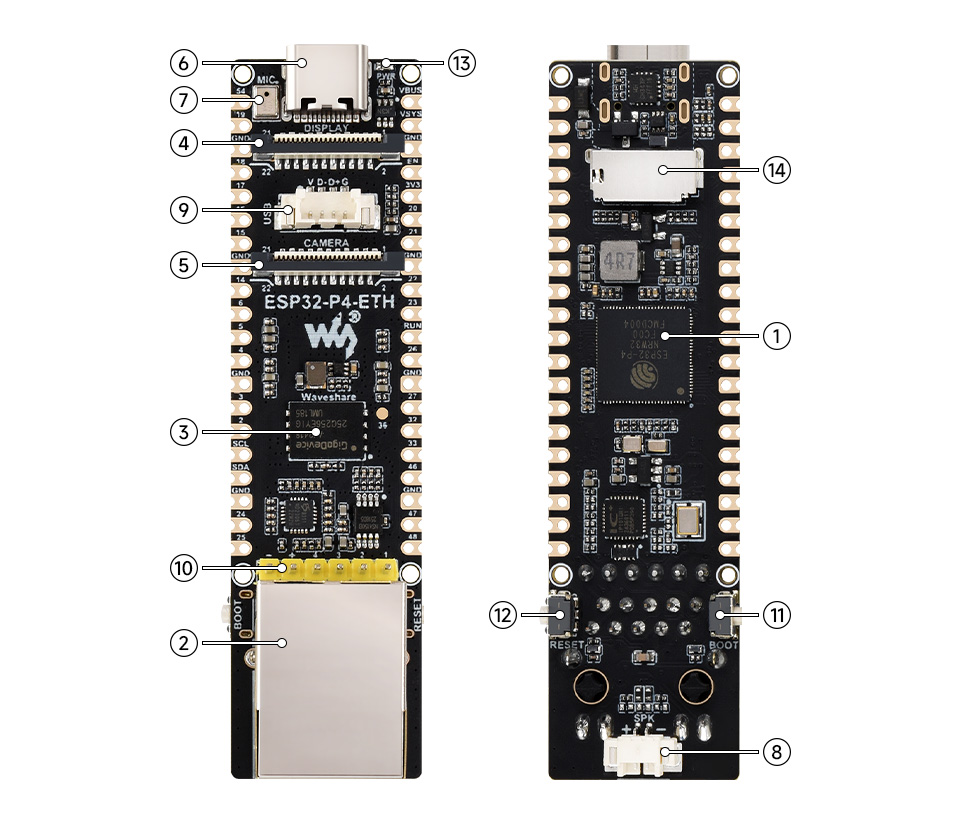
This project targets the Waveshare ESP32-P4-WIFI6-POE-ETH with the following requirements:
- Board: Waveshare ESP32-P4-WIFI6-POE-ETH (or compatible ESP32-P4 with Ethernet)
- PSRAM: 32 MB PSRAM (required for large data arrays)
- Ethernet: 10/100 Mbps Ethernet connection
The 32 MB PSRAM is essential for storing large data arrays including I/O signals, registers, variables, and position data that would be present in a real robot controller.
Supported CIP Classes
The simulator implements all Motoman vendor-specific CIP classes:
| Class | Hex | Decimal | Name | Description |
|---|---|---|---|---|
| 0x70 | 112 | MotomanAlarm | Active Alarms | |
| 0x71 | 113 | MotomanAlarmHistory | Alarm History | |
| 0x72 | 114 | MotomanStatus | Robot Status | |
| 0x73 | 115 | MotomanJobInfo | Job Information | |
| 0x74 | 116 | MotomanAxisConfig | Axis Configuration | |
| 0x75 | 117 | MotomanPosition | Robot Position | |
| 0x76 | 118 | MotomanPositionDeviation | Position Deviation | |
| 0x77 | 119 | MotomanTorque | Axis Torque | |
| 0x78 | 120 | MotomanIO | I/O Signals | |
| 0x79 | 121 | MotomanRegister | Registers | |
| 0x7A | 122 | MotomanVariableB | Byte Variables | |
| 0x7B | 123 | MotomanVariableI | Integer Variables | |
| 0x7C | 124 | MotomanVariableD | Double Integer Variables | |
| 0x7D | 125 | MotomanVariableR | Real Variables | |
| 0x7F | 127 | MotomanVariableP | Position Variables | |
| 0x80 | 128 | MotomanVariableBP | Base Position Variables | |
| 0x81 | 129 | MotomanVariableEX | External Axis Variables | |
| 0x8C | 140 | MotomanVariableS | String Variables |
Pre-Initialized Data
The simulator comes with pre-initialized robot data to facilitate immediate testing:
- Status Data: Robot status bits (Auto mode, Play mode, Servo On)
- Job Info: Current job name, line number, step number, speed override
- Axis Configuration: 6-axis robot configuration
- Position Data: Robot position (pulse values) for multiple instances
- Position Deviation: Axis position deviation values
- Torque Data: Axis torque values
- I/O Signals: Pre-configured I/O signal states
- Registers: Pre-initialized register values (M000-M999)
- Variables: Pre-initialized values for B, I, D, R, S, P, BP, EX variables
Device Identity
The simulator presents itself as:
- Vendor ID: 44 (Yaskawa Electric America, Inc.)
- Device Type: 12 (Communications Adapter)
- Product Code: 1281
- Product Name: "DX200 EtherNet/IP Module"
- Revision: 1.1
Web-Based Configuration
The simulator includes a web-based configuration interface:
- Network Configuration: Configure DHCP or static IP settings
- Device Management: View device status and configuration
- Access: Open a web browser and navigate to
http://<device-ip>
Note: Network configuration changes require a device reboot to take effect.
Testing with EtherNet/IP Scanner
The simulator is compatible with EtherNet/IP Explorer and other CIP diagnostic tools:
- Connect your EtherNet/IP scanner application to the simulator's IP address
- Use your scanner to read from any of the supported CIP classes
- All classes support
Get_Attribute_Singleand many supportGet_Attribute_All - Compare the data returned by the simulator with expected values from the pre-initialized data reference
Software Requirements
- ESP-IDF: Version 5.1 or later
- Python: 3.8 or later
- CMake: 3.16 or later
Development Use Cases
This simulator is designed to help in the development of EtherNet/IP scanner applications:
- Consistent Test Target: Provides a stable, predictable test environment
- Realistic Data: Pre-initialized with realistic robot data
- Full Protocol Support: Implements all Motoman CIP classes used by real controllers
- Easy Configuration: Web interface for network and device settings
- Debugging Support: Serial logging for troubleshooting